
How to organise a pantry that stays organised
Give each food category a fixed place and put newer stock behind food to use sooner. Use what is already at home when planning the next shop. Marsonya keeps pantry, fridge and freezer records together, with barcode lookup and camera date scanning to reduce repeated entry.
A pantry is easier to check when each category has a fixed place. Put new groceries in those places as you unpack, with earlier-dated food where you can reach it first.
Marsonya keeps household food records and the next shopping plan together. Join the early-access list to hear when access opens.
Why does pantry organisation break down after a few weeks?
After the first tidy, every grocery shop adds more items. If they go wherever there is a gap, categories become scattered and older stock gets hidden. Shelf labels help everyone unpacking the shopping use the same layout. Keep the system simple enough to reset during normal unpacking.
The pantry zones guide covers the layout. The FIFO rotation guide explains how to use older stock first.
Do I need an app to track my pantry?
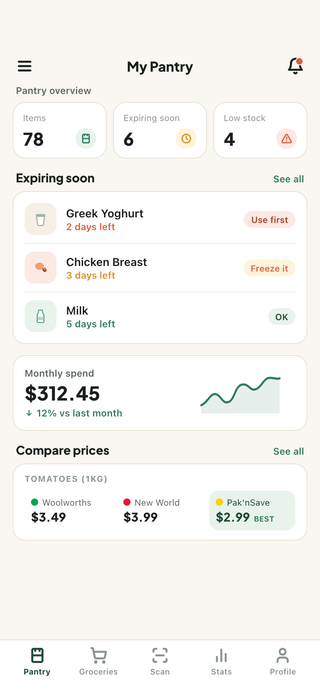
An app is useful when you want the household’s food information available away from the kitchen. Marsonya brings stock and shopping lists together. Barcode lookup identifies packaged food, camera scanning saves recognised printed dates, and quick quantity-use swipes update tracked stock. You can look up food while shopping instead of copying it into a separate list.
Use the record to plan meals around food nearing its date and build a shopping list from what is missing.
If you keep finding an extra packet after shopping, see how to stop buying groceries you already have. Start with the repeat purchases rather than recording the whole kitchen at once.
See what belongs on a pantry inventory checklist and which information helps with the next shop without a detailed kitchen ledger.
For choosing dinner from that food, see meal planning from your pantry, fridge and freezer. Start with familiar meals and buy the ingredients still missing.
For food that stays frozen between shops, see how to keep a useful freezer inventory. Remember frozen meals and ingredients before adding more to the shopping list.
What's a simple system for organising a pantry?
- Give every category one home. Group baking supplies, tins, snacks and breakfast foods in fixed shelf areas. Check each area before adding those foods to your list.
- Run FIFO within each zone. First in, first out: new stock goes behind old stock, so the next hand takes the older packet first.
- Keep dates where eyes go. Face use-by items forward at eye level. A date hidden behind a cereal box expires unseen.
- Use food that needs eating sooner. When choosing a meal, use the expiry view to find suitable food already at home. Follow its label and storage instructions.
How does Marsonya track what's in your pantry?
- Inventory trackingadd, edit, consume and move items across pantry, fridge and freezer
- NZ catalogue searchreal products from Woolworths, Pak'nSave and New World, not a generic global list
- Barcode scanning
- Expiry sorting and alertsitems ordered by days left and coloured by urgency, with reminders before a date passes
What else do people ask about pantry tracking?
How long does setting up a pantry app take?
Start with food that affects your next shop. Barcode lookup identifies packaged products, and camera scanning saves recognised printed dates. Catalogue search and quick quantity-use swipes help keep the record useful; a complete kitchen count is unnecessary.
Does Marsonya cover the fridge and freezer too?
Yes. Items are recorded in the pantry, fridge or freezer, with an expiry-sorted view for each area. When you move food, edit its storage location rather than creating another entry.
Can the whole household use one pantry?
Yes. A household can share its pantry and shopping lists, so the person unpacking groceries and the person cooking dinner see the same shelves. Changes sync when devices come online.
What happens when the phone is offline?
Your saved pantry stays readable and editable without a connection. Changes wait to sync until the network returns. Adding a product through a catalogue lookup still needs a connection.